Automate your Apple Orchard.

Name changes on autopilot. Spend 90% less time changing and tracking orders.

Out of Stock Join the Discord
Windows macOS
Orchard’s Tasks screen: orders with their store and status, like Name Updated, QR Code Sent, Ready for Pickup and Pickup Confirmed

The real app · sample orders

01 · VOLUME

Built for volume

Start every task on a tab, or only the ones you select. You choose how many browsers run at once, and each order shows its status live.

02 · TEAMS

Built for teams

Every person signs in with their own license key, and each key turns on its own features. Runners only have to react to a post in your Discord, and the app does the rest.

03 · CURRENT

Built to stay current

Orchard checks for updates when it opens and every 15 minutes, then installs them in seconds. It waits for running tasks, and your tasks, Apple IDs and settings stay as they are.

Features

No Emails? No Problem.

Keep track of all your orders without needing access to the emails. The order number and email are all Orchard needs.

Pickup status Pick up by date Pickup store Quantity Order Status

Update Pickup Name

Change who picks up one order or five hundred. Paste your orders one per line, pick the Apple ID and proxy list, then press Start.
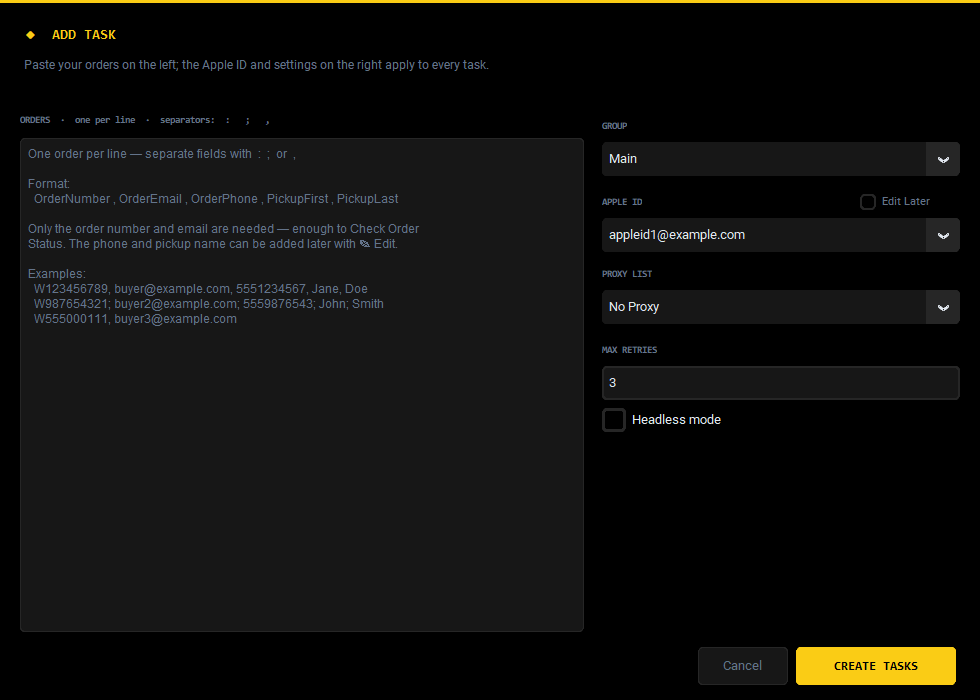
The Add Task window: a box to paste orders, with Group, Apple ID, Proxy List and Max Retries

Auto Checker

When a runner reacts 👍 or ✅ to a post, Orchard checks that order’s pickup on its own.

  • Works on QR code and Pickup Name Updated posts
  • Checks again every 5 minutes until Apple shows it picked up
  • The post changes to ✅ Picked Up once it’s confirmed
  • Take the reaction off and the checks stop

Cancel Orders

Cancel orders at Apple, one phone at a time.

  • Reads the order page first, so nothing already cancelled or picked up gets clicked
  • Asks you to confirm every time, because it can’t be undone
  • Each result posts to your Cancel Order webhooks

View QR Code

Takes a sharp picture of the in-store pickup instructions, with the QR code and order number, and posts it to the QR webhooks you tick.
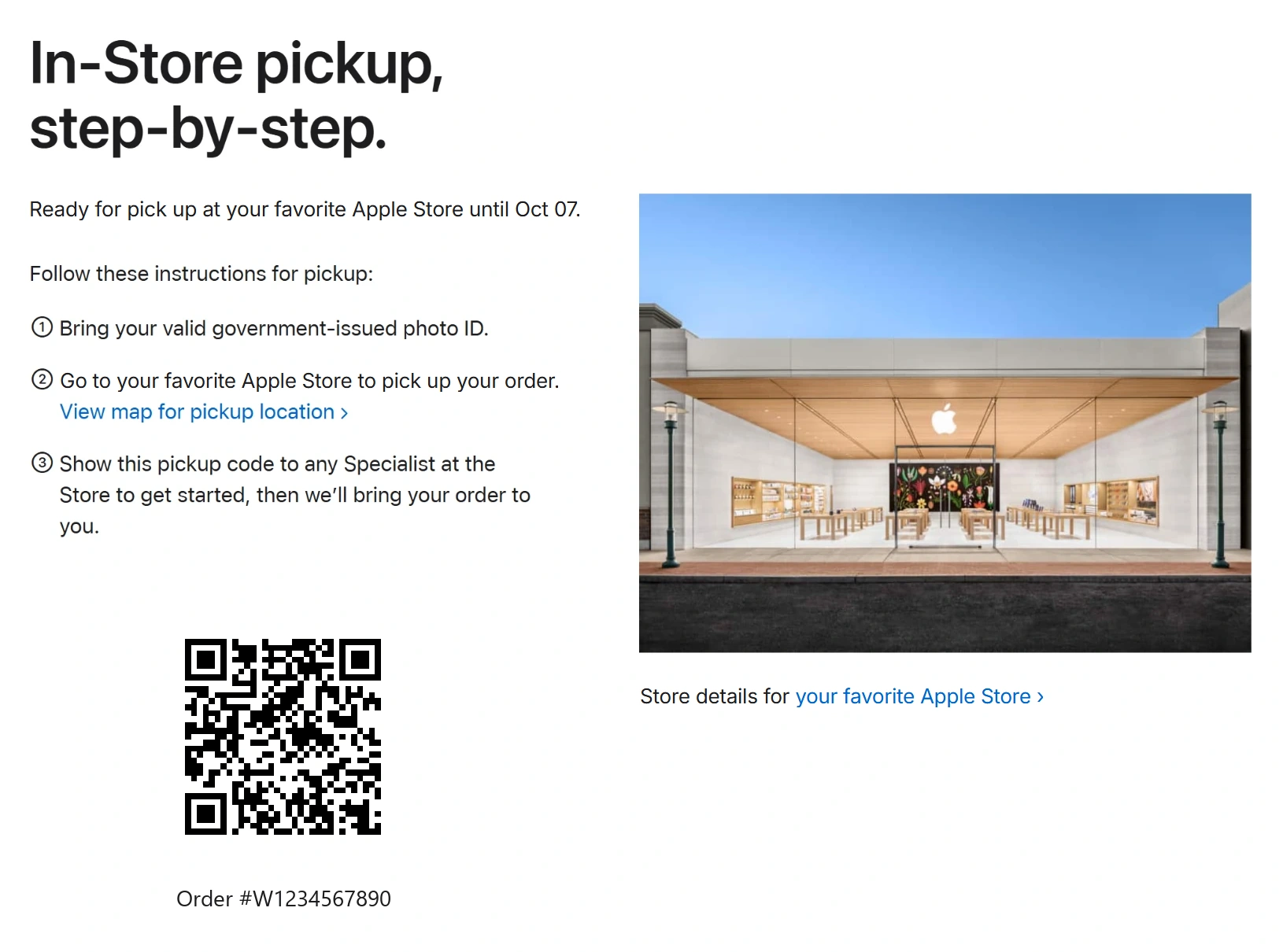
A pickup instructions picture: ready for pickup at your favorite Apple Store until the pick-up-by date, the pickup steps, a QR code and the order number (sample, QR scrambled)

Check Order Status

Reads each order’s status from its own order page. It doesn’t sign in, and most orders take a few seconds.
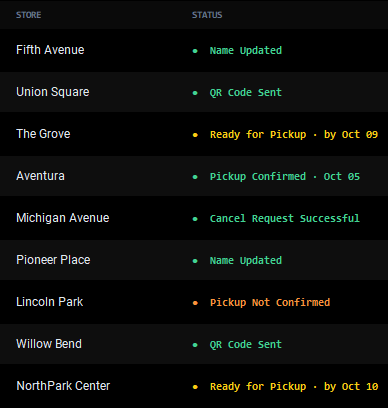
Order statuses in the app: Ready for Pickup by Oct 09, Pickup Confirmed Oct 05, Cancel Request Successful, Pickup Not Confirmed

Google Sheets

Send your orders to your own Google Sheet, straight from the right-click menu.

  • One row per iPhone
  • State tax added to the price
  • Orders turn yellow when ready, green when picked up and red when cancelled

Discord Import

Reads the order posts in your Discord channels and turns the ones you tick into tasks, with the email, phone, store and quantity filled in.
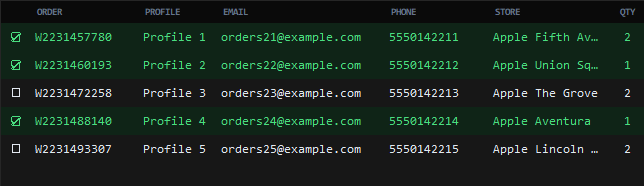
Orders read from Discord, with the ticked ones highlighted green
Webhooks

Every result, right where your team already is.

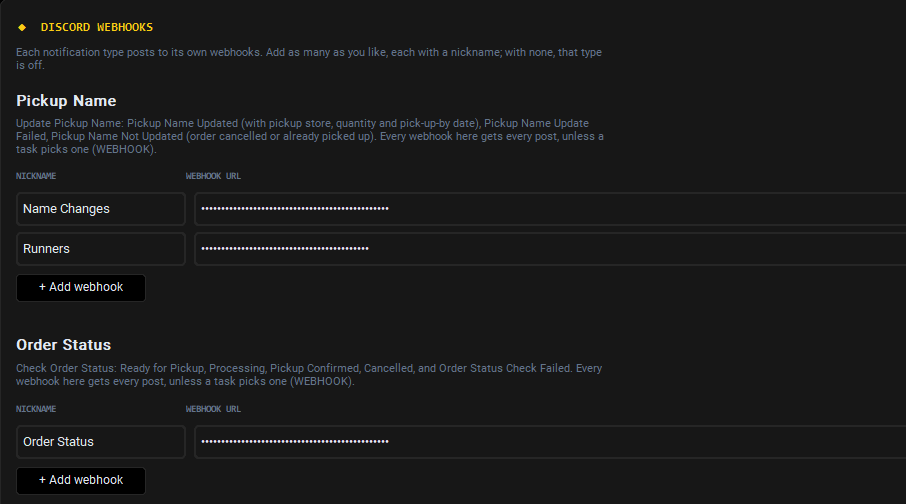
Save as many Discord webhooks as you like, each with a nickname. Each time you start a run, tick the ones it should post to.
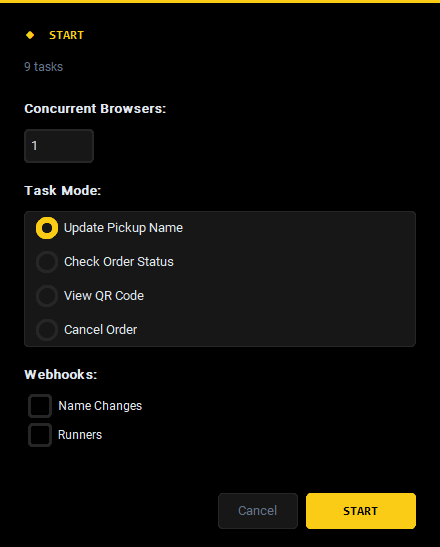
  • Chosen per run. Nothing is ticked ahead of time and there’s no fallback, so posts never go to the wrong channel.
  • Private details stay hidden. Order numbers, emails and phone numbers are posted as spoilers.
  • Posts update themselves. When an order is picked up, its earlier QR posts change to ✅ Picked Up.
  • Nothing gets lost. If Discord asks it to slow down or can’t be reached, Orchard waits and sends the post later.
Settings: Discord webhooks for Pickup Name and Order Status, each with a nickname and a Send test button The Start window: concurrent browsers, task mode and the webhooks to post to
How it works

Hours of work cut down to three steps.

01

Add your orders

Paste one line per order, such as ORDER : EMAIL : PHONE : FIRST : LAST, or import them from your Discord channel.

02

Pick what to run

Choose Update Pickup Name, Check Order Status, View QR Code or Cancel Order. Then set how many browsers run at once and which webhooks get the results.

03

Watch it land

Statuses update live in the app and results post to your channels. Your sheet changes color as orders are picked up.

Access

One app, you decide what’s on your key.

Example key: BlossomName changes are always on. Each feature you add moves your key up a tier.

    Keys are out of stock right now. Restocks are announced in our Discord first.

    Next restock

    Put your orders on autopilot.

    Keys are out of stock right now. Join the Discord to hear about the next restock first.

    Out of Stock Join the Discord